Technical Articles
How SEO Works Step by Step
Search engine optimization is a critical skill for building visibility online. By understanding how search engines crawl, index, and rank content, you can create more relevant, accessible, and valuable experiences for users. This guide breaks down the process step by step and highlights practical actions you can take to improve your site’s performance with search engine optimization.
Introduction to SEO
SEO stands for search engine optimization, a practice centered on making your website more attractive to search engines like Google, Bing, and others. The ultimate goal is to earn higher rankings for relevant queries, drive organic traffic, and increase the likelihood that visitors convert into customers, subscribers, or readers. In this section, we’ll outline the core idea: search engines aim to deliver the best possible results, and SEO is about aligning your content, technical setup, and user experience with what search engines consider high quality.
Step 1: Understanding Search Engine Basics
Before you optimize, you should know how search engines operate at a high level:
- Crawling: Bots scan the web to discover pages.
- Indexing: Discovered pages are analyzed and stored in an index.
- Ranking: When a user queries, the search engine evaluates which pages to show and in what order.
- Ranking signals: Relevance, authority, user experience, and technical factors influence rankings.
Key takeaway: SEO is not a one-size-fits-all task; it’s an ongoing process of improving content relevance, site structure, and trust signals.
Step 2: Keyword Research and Strategy
Keyword research is the foundation of effective SEO. It involves identifying terms people use to search for your topics and understanding intent behind those searches. Practical steps include:
- Brainstorm seed keywords related to your topic.
- Use keyword planning tools to discover search volume, competition, and related terms.
- Analyze search intent: informational, navigational, transactional, or commercial investigation.
- Group keywords into topic clusters and map them to pages on your site.
In this guide, we focus on the broader concept of search engine optimization, but keyword research is a crucial part of that process. By selecting relevant keywords and matching them to high-quality content, you improve your chances of ranking for terms your audience actually uses.
Step 3: On-Page Optimization
On-page optimization involves making sure each page clearly communicates its purpose and provides value to visitors. Important elements include:
- Title tags: Craft compelling, keyword-rich titles that reflect the page’s content.
- Meta descriptions: Write concise summaries that entice clicks and include relevant keywords.
- Headers (H1, H2, H3): Structure content for readability and signal topic hierarchy.
- Content quality: Write informative, well-researched, and original content that answers user questions.
- URL structure: Use clean, descriptive URLs that include target keywords where appropriate.
- Internal linking: Create a logical network of internal links to distribute authority and help users navigate.
- Image optimization: Use descriptive alt text and optimize file sizes to improve accessibility and load times.
Remember, on-page optimization is about clarity, usefulness, and aligning with user intent while signaling relevance to search engines through structured content.
Step 4: Technical SEO
Technical SEO focuses on the behind-the-scenes aspects that affect crawling, indexing, and user experience. Key areas include:
- Site speed: Optimize loading times through image compression, caching, and efficient code.
- Mobile-friendliness: Ensure responsive design and good usability on small screens.
- SSL/HTTPS: Secure connections build trust and are a ranking factor for many engines.
- XML sitemaps: Help search engines discover and index pages efficiently.
- Robots.txt: Guide crawlers on which pages to crawl or avoid.
- Structured data: Implement schema markup to enhance search results with rich snippets.
- Crawl budget: Manage how many pages are crawled and indexed based on site size and importance.
Technical SEO is often the difference between a good site and a great one, especially for larger sites with many pages.
Step 5: Content Strategy and Creation
Content is at the heart of SEO. A strong content strategy addresses user needs and aligns with your keyword research and topic clusters. Focus areas include:
- E-A-T principles: Expertise, Authoritativeness, and Trustworthiness.
- Long-form content: Comprehensive guides that thoroughly answer questions tend to perform well.
- Content freshness: Regular updates and new content signal ongoing relevance.
- Multimedia inclusion: Use images, video, and diagrams to enrich understanding.
- Content audits: Periodically review and update older content to maintain accuracy and relevance.
Balanced content creation also considers user experience, readability, and accessibility to ensure broad reach.
Step 6: Off-Page SEO and Authority Building
Off-page SEO involves signals outside your site that influence rankings, primarily links and brand signals. Effective off-page strategies include:
- Backlink outreach: Earn high-quality, relevant links from authoritative sites.
- Content promotion: Share valuable content on social media, communities, and industry forums.
- Brand building: Establish a recognizable, trustworthy presence online.
- Digital PR: Create compelling stories or data-driven insights that earn media coverage.
While links remain a core ranking factor, quality matters more than quantity. Focus on earning links from relevant, reputable sources.
Step 7: Analytics, Measurement, and Optimization
SEO is an ongoing loop of measurement and improvement. Key activities:
- Set up analytics: Track traffic, conversions, and on-page engagement.
- Monitor rankings and visibility: Use dashboards to watch keyword performance.
- Analyze user behavior: Look at bounce rate, time on page, and path through your site.
- Conduct A/B tests: Experiment with titles, meta descriptions, and page layouts.
- Iterate based on findings: Refresh content, adjust keywords, and improve technical issues.
Data-driven optimization helps you allocate resources effectively and demonstrates ROI.
How SEO Works Step by Step – Final Thoughts
Understanding how SEO works step by step gives you a practical roadmap for improving online visibility. From initial keyword research to technical optimization, content creation, off-page signals, and ongoing measurement, each component plays a vital role in helping search engines understand and rank your site. Stay patient, be consistent, and focus on delivering real value to your audience. With thoughtful, iterative work on search engine optimization, you can achieve sustainable growth and better search performance over time.
Contact us today and let us help you improve your rankings!
Technical Articles
What are the 5 Major Components of a Web Page?
In the increasingly digital world, understanding what makes up a web page is foundational for anyone involved in the web design process. A well-structured page not only looks good but also performs well, loads quickly, and offers a smooth user experience. Here, we break down the five major components that every web page needs and explain how they fit into the broader web design process.
1) Structure: The HTML Backbone
The first major component of any web page is its structure, created with HTML. HTML provides the semantic skeleton of the page, defining elements such as headings, paragraphs, lists, images, links, and forms. A solid markup approach:
- Uses semantic tags (for example, header, nav, main, article, section, footer) to convey meaning.
- Ensures accessibility so assistive technologies can interpret content correctly.
- Improves SEO by giving search engines clear signals about the page’s hierarchy and content.
In the context of the web design process, drafting clean HTML is typically one of the initial steps. It establishes the foundation upon which styling (CSS) and interactivity (JavaScript) are layered.
2) Presentation: Styling with CSS
Once the structure is in place, CSS handles presentation. Styling determines how a page looks and feels, including color schemes, typography, spacing, and layout. Key aspects include:
- Responsive design to adapt layouts for desktops, tablets, and mobile devices.
- A consistent visual language that aligns with branding and user expectations.
- Accessibility considerations such as color contrast and focus indicators.
Within the web design process, CSS is where a designer translates wireframes and designs into a live, visually compelling experience. Modern CSS techniques, flexbox, grid, custom properties (variables), and media queries, enable sophisticated and maintainable styles.
3) Behavior: Interactivity with JavaScript
Interactivity brings web pages to life. JavaScript, the language of the browser, adds behavior such as form validation, animations, user feedback, and asynchronous data loading. Important elements of the behavior component include:
- DOM manipulation to respond to user actions (clicks, hovers, scrolls).
- Asynchronous requests (AJAX/fetch) to fetch data without reloading the page.
- Progressive enhancement to ensure core content remains accessible even if scripts fail.
In the web design process, JavaScript is integrated after the basic structure and styling are in place. It enhances usability but should never be required for core content to be accessible.
4) Content: Text, Images, and Media
Content is at the heart of any web page. High-quality, relevant content informs, persuades, and engages visitors. This component includes:
- Clear, concise copy that communicates the page’s purpose.
- Visuals such as images, icons, and videos that complement and reinforce the message.
- Structured content with headings, lists, and alt text for accessibility and SEO.
Within the web design process, content strategy is often developed in parallel with design. This ensures that typography, hierarchy, and media choices support readability and user goals.
5) Performance and Accessibility: Speed, Usability, and Reach
The fifth major component encompasses how quickly a page loads and how accessible it is to all users. This includes:
- Performance optimization: minifying assets, optimizing images, caching, and efficient code.
- Accessibility (a11y): semantic HTML, keyboard navigation, screen reader compatibility, and appropriate contrast.
- SEO considerations: proper metadata, structured data, and crawlable links.
Optimizing for performance and accessibility is not a one-off task but an ongoing part of the web design process. It ensures that the page serves a broad audience across devices and network conditions.
The Web Design Process: Bringing the Five Components Together
Understanding the five major components helps demystify the web design process. A typical workflow might look like this:
- Discovery and planning: Define goals, audience, and success metrics.
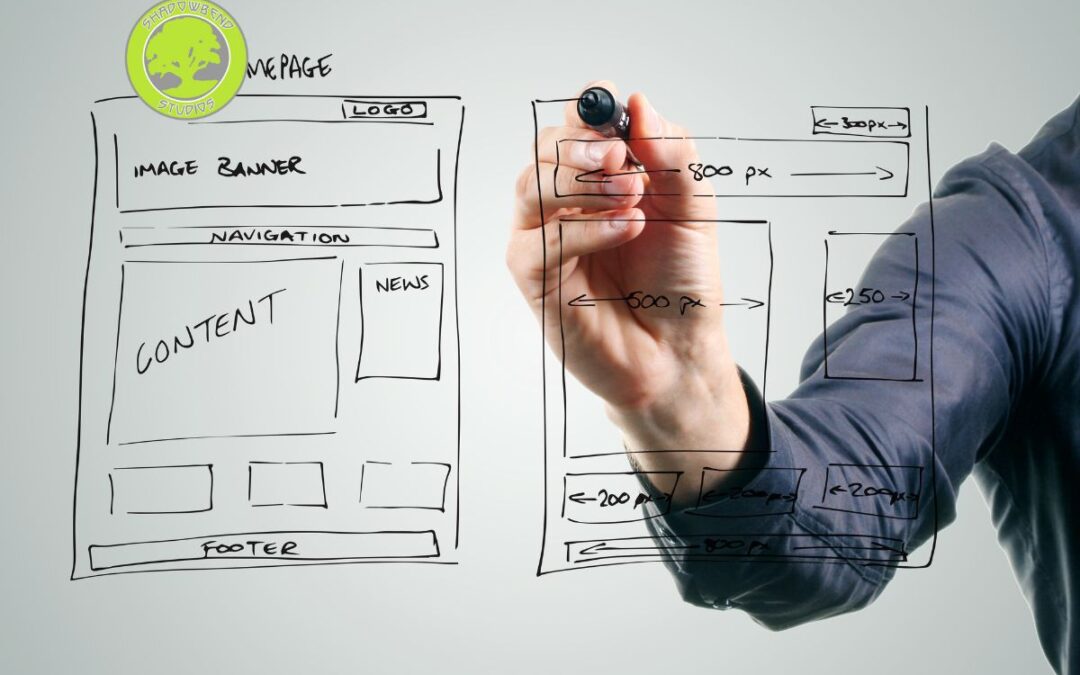
- Information architecture and wireframing: Outline content structure and navigation.
- Visual design: Create mockups and style guides that reflect branding.
- Development: Implement HTML, CSS, and JavaScript; integrate content.
- Testing and optimization: Check performance, accessibility, and cross-browser compatibility.
- Launch and ongoing maintenance: Monitor metrics and update content and features as needed.
Throughout these stages, the web design process emphasizes collaboration among designers, developers, content creators, and stakeholders. A successful page balances aesthetics with function, delivering a seamless experience for users while meeting business objectives.
What are the 5 Major Components of a Web Page? – Final thoughts
A web page is more than a collection of elements; it’s a carefully engineered product that combines structure, presentation, behavior, content, and a commitment to performance and accessibility. By focusing on these five major components, teams can streamline the web design process and produce pages that are not only beautiful but also fast, accessible, and effective at achieving their goals. With thoughtful planning and ongoing optimization, any web page can deliver a strong, user-centered experience that stands up in today’s competitive digital landscape.
Visit our blog page for more informative articles
Technical Articles
What are the 5 Areas of Web Design?
What are the 5 Areas of Web Design? Web design is a multifaceted discipline that blends creativity with technical precision. When teams discuss a new website project, they often break the work into core areas to ensure every important element is addressed. Understanding the five key areas of web design helps clarify responsibilities, align expectations, and deliver a polished final product. In this post, we’ll explore these five areas and connect them to web design best practices that help websites perform, convert, and resonate with users.
1) Visual Design and Branding
Visual design is the first thing many visitors notice. It encompasses color palettes, typography, imagery, layout, and overall aesthetic. The goal is to create a visually cohesive experience that reinforces brand identity while guiding users toward important actions.
- Color and typography: Choose a system of fonts and a color scheme that reflect the brand personality and ensure readability across devices.
- Imagery and iconography: Use high-quality images and icons that support content and communicate meaning quickly.
- Layout and grid systems: Implement consistent spacing, alignment, and hierarchy so content feels organized and approachable.
- Brand consistency: Ensure logos, slogans, and design motifs are applied uniformly across pages and channels.
Web design best practices in visual design emphasize accessibility, contrast ratios, and responsive behavior so that the site looks good and functions well for everyone, including people with disabilities.
2) User Experience (UX) and Information Architecture
UX focuses on how users interact with the site, while information architecture (IA) organizes information in a way that makes sense and is easy to navigate. Together, they determine how quickly visitors can find what they need and complete tasks such as making a purchase, signing up for a newsletter, or requesting a quote.
- Clear navigation: Create intuitive menus, search capabilities, and breadcrumb trails to help users move through the site.
- Task flows: Map typical user journeys and optimize steps to reduce friction.
- Content organization: Structure information into logical categories with meaningful headings and labels.
- Accessibility and usability: Design for keyboard navigation, screen readers, and inclusive experiences.
Web design best practices in UX and IA emphasize user testing, heuristic evaluation, and ongoing refinement. The most successful sites continuously iterate based on real user feedback.
3) Front-End Development and Performance
Front-end development turns design into an interactive, fast-loading website. This area translates visual concepts into code and ensures the site runs smoothly on desktops, tablets, and mobile devices.
- Responsive design: Use flexible grids, media queries, and fluid images to adapt to different screen sizes.
- Performance optimization: Minimize file sizes, leverage caching, optimize images, and implement lazy loading where appropriate.
- Accessibility implementation: Add semantic HTML, ARIA attributes, and proper keyboard focus management.
- Cross-browser compatibility: Test and adjust for major browsers to provide a consistent experience.
Web design best practices here include semantic HTML, progressive enhancement, and a commitment to measured performance metrics such as Core Web Vitals. Efficient front-end work improves user satisfaction and search engine rankings.
4) Content Strategy and SEO
Content is not just text; it’s a strategic asset that informs, persuades, and delights. A strong content strategy supports the site’s goals, helps users answer questions, and signals relevance to search engines.
- Clear, user-centered copy: Write content that speaks to the audience, answers their questions, and drives action.
- SEO fundamentals: Use descriptive titles, meta descriptions, heading structure, and keyword optimization to improve visibility.
- Content hierarchy: Organize content with scannable headings, bulleted lists, and digestible paragraphs.
- Content governance: Plan for updates, tone of voice, long-term stewardship, and editorial calendars.
Web design best practices in content strategy and SEO emphasize authentic keyword usage, structured data where appropriate, and content that aligns with user intent. When executed well, content improves both discovery and conversion.
5) Quality Assurance, Testing, and Maintenance
A website is not a set-and-forget project. Quality assurance (QA), testing, and ongoing maintenance ensure long-term reliability, security, and relevance.
- QA testing: Validate forms, interactive features, links, and dynamic content across devices and browsers.
- Performance monitoring: Regularly test load times, uptime, and resource usage.
- Security and compliance: Implement up-to-date security measures, privacy considerations, and accessibility standards.
- Maintenance plan: Schedule content updates, plugin or framework updates, and periodic redesign audits.
Web design best practices in this area focus on a proactive approach to catching issues before users encounter them and keeping the site aligned with evolving technologies and user expectations.
How the Five Areas Interact
These five areas do not operate in isolation. They overlap and influence each other in meaningful ways:
- Visual design sets the tone for UX and storytelling but must be feasible within front-end development constraints.
- UX and IA determine what content should exist and how it should be structured and labeled.
- Front-end development makes the design come alive while affecting performance and accessibility.
- Content strategy informs how pages are organized and discovered through search.
- QA and maintenance ensure that changes in one area don’t inadvertently disrupt others.
A successful website harmonizes all five areas through collaborative processes, clear requirements, and ongoing optimization.
What are the 5 Areas of Web Design? – Final thoughts
Understanding the five areas of web design provides a practical blueprint for building sites that look good, work well, and meet business goals. By investing in strong visual design and branding, thoughtful UX and IA, robust front-end development and performance, strategic content and SEO, and disciplined QA and maintenance, teams can deliver experiences that delight users and stand the test of time. If you’re embarking on a new website project, consider auditing each area against your objectives and user needs, and use web design best practices as your guardrails for success.
Contact Shadowbend Studios today and let us answer your web design questions.

Technical Articles
What is Web Hosting and How Does It Work?
What is Web Hosting and How Does It Work? Web hosting is a fundamental building block of the internet, enabling websites to be accessible to anyone with an internet connection. If you’ve ever wondered what happens behind the scenes when you type a domain name into your browser, this article breaks down the concept of web hosting in clear terms and explains how it works step by step. By the end, you’ll have a solid understanding of why web hosting matters and what to consider when choosing a hosting provider.
Introduction to Web Hosting
At its core, web hosting is a service that stores your website’s files on a server and makes them available over the internet. When someone visits your site, their browser requests the files from the server, which then sends them back to display the web page. Think of a web host as the digital real estate where your website lives. Without hosting, your site would be a collection of files on a computer that nobody could access remotely.
The term “web hosting” encompasses several related services, including domain management, email hosting, security features, and performance optimizations. However, the primary function is to ensure your website is online and reachable around the clock.
How Web Hosting Works: The Basic Architecture
Understanding web hosting becomes much easier when you picture the typical three-tier architecture of most websites:
- Client (Your visitors): Uses a web browser to request a web page.
- Web Server: The computer that stores your website’s files and serves them to visitors.
- Database Server (optional): Stores dynamic data for sites that rely on databases (for example, user accounts, blog posts, product inventories).
Here’s a simplified flow of a user visiting a site:
- The user types a domain name (for example, example.com) into a browser.
- The DNS (Domain Name System) translates the domain into an IP address of the web server hosting the site.
- The browser sends an HTTP or HTTPS request to the web server at that IP address.
- The web server processes the request, retrieves the appropriate files (and database data if needed), and sends them back to the browser.
- The browser renders the web page for the user.
Types of Web Hosting
There isn’t a one-size-fits-all solution; different hosting types serve different needs. Here are the most common options:
- Shared Hosting: Multiple websites share the same server resources. It’s cost-effective and beginner-friendly but can be slower or less secure under heavy traffic.
- VPS Hosting (Virtual Private Server): Shares a server with others but segments resources for each user. Provides better performance and control than shared hosting.
- Dedicated Hosting: You lease an entire physical server. Maximum performance and customization but at a higher cost and complexity.
- Cloud Hosting: Resources are spread across multiple servers in a network. Offers scalability and redundancy; you pay for what you use.
- WordPress Hosting: Optimized hosting environment specifically for WordPress sites, often including pre-configured caching, backups, and security features.
- Managed vs. Unmanaged Hosting: Managed hosting includes provider-backed maintenance (updates, security, backups), while unmanaged requires you to handle setup and ongoing maintenance.
Key Components of a Web Hosting Service
- Server Space: The storage where your website’s files live.
- Bandwidth: The amount of data that can be transferred from the server to visitors.
- Uptime: The percentage of time the server is online and serving pages.
- Control Panel: A web interface (like cPanel or Plesk) to manage files, databases, domains, and emails.
- Security: Firewalls, SSL certificates, backups, and malware scanning.
- Support: Customer service to assist with technical issues.
- Performance Features: Caching, CDN integration, and optimization tools.
How to Choose a Web Hosting Provider
When selecting a hosting provider, consider these factors:
- Reliability and Uptime: Look for providers with strong uptime guarantees (typically 99.9% or higher).
- Performance: Server location, caching, and CDN options can affect page load times.
- Scalability: The ability to upgrade resources as your site grows.
- Security: SSL/TLS, daily backups, malware scanning, and proactive updates.
- Price and Value: Balance cost with included features and support quality.
- Support and Resources: Availability of 24/7 support, knowledge bases, and migration help.
- Ease of Use: Intuitive control panels and one-click installations for popular platforms.
Common Technologies Behind Web Hosting
- HTTP/HTTPS: Protocols for transferring web pages; TLS encryption for secure connections.
- DNS: System that translates domain names to IP addresses.
- FTP/SFTP: Methods to transfer files to and from the server.
- Databases: MySQL, PostgreSQL, or NoSQL databases for dynamic sites.
- CMS and Frameworks: WordPress, Drupal, Joomla, and various frameworks that run on the hosting environment.
- Server-Side Languages: PHP, Python, Ruby, Node.js, Java, among others.
Your Website’s Journey: From Domain to Display
- Domain Registration: Purchase a domain name that people will type to reach your site.
- DNS Configuration: Point your domain to your hosting provider’s servers.
- Website Deployment: Upload or build your site files on the host.
- Security and Maintenance: Keep software up to date, implement SSL, and monitor uptime.
- Regular Backups: Protect your content with periodic backups.
What is Web Hosting and How Does It Work? – Final Thoughts
Web hosting is more than just a place to store files. It’s the foundation that determines your site’s accessibility, speed, and security. By understanding the different hosting types, key components, and how to evaluate providers, you can choose a solution that fits your needs, whether you’re launching a personal blog, a portfolio, or a large e-commerce store. Remember, the hosting environment influences user experience as much as the design and content of your site. If you’re ever unsure, start with a reliable shared hosting plan and scale up as your audience grows. Web hosting is a practical, scalable, and essential part of building a successful online presence.
Contact us today for any questions you may have regarding Web Design, Graphic Design, SEO or Social Media Marketing

Business Articles
Is graphic design still worth it in 2025?
Graphic design in the marketplace has evolved rapidly, but its value remains strong. As technology, culture, and consumer expectations shift, the role of designers adapts rather than diminishes. This post explores why graphic design is still worth pursuing in 2025, how the marketplace has changed, and how you can position yourself to thrive.
Introduction: why this question matters in 2025
Every few years, the question surfaces: is graphic design still worth it? In 2025, the answer is a resolute yes for many reasons. The demand for visually compelling, accessible, and effective communication continues to grow as brands seek to stand out in crowded digital spaces. Graphic design in the marketplace is not just about making things look pretty; it’s about solving problems, guiding user experiences, and telling stories that resonate. Whether you’re a student, freelancer, or in-house designer, understanding the current landscape helps you leverage your skills for value and impact.
The current state of the marketplace for graphic design
A saturated yet vibrant marketplace
The graphic design in the marketplace is competitive, with countless freelancers, agencies, and in-house teams. Saturation often gets framed as a downside, but it also fuels innovation. Designers are pushed to differentiate through a distinctive style, process, or domain expertise. Specialization, branding for fintech, packaging for sustainable products, or UI design for electronic health records, can create clear demand. In 2025, versatility remains vital, but depth in a niche can command premium fees and stronger client trust.
The rise of hybrid skill sets
The modern designer often blends traditional craft with technical and strategic capabilities. Proficiency in typography, color theory, and layout remains foundational, but competencies in user experience (UX), user interface (UI), motion graphics, and data visualization add significant value. The ability to translate insights from research into design decisions helps ensure that work moves beyond aesthetics into measurable outcomes. This hybrid skill set is a hallmark of graphic design in the marketplace today.
Value-based pricing and measurable impact
Clients increasingly expect design to contribute to business outcomes. Instead of charging by the hour, many designers and agencies are adopting value-based pricing, pricing packages, or retainer models that align with project goals. Demonstrating impact through metrics, conversion rate improvements, engagement, or time-on-task reductions, can justify premium pricing. This shift reinforces the idea that graphic design is an investment, not a cost.
Why graphic design remains essential
Visual storytelling that builds trust
Humans are highly visual, and first impressions often hinge on design quality. A strong visual identity communicates credibility, consistency, and professionalism. In marketplaces crowded with competing messages, good graphic design helps brands tell a coherent story across logos, websites, social media, packaging, and ads. This storytelling is not superficial; it’s a strategic tool for guiding perception and behavior.
Usability and accessibility as design outcomes
Design is not just about beauty; it’s about making information accessible and usable. In 2025, accessibility standards are increasingly integrated into the design process. Clear typography, sufficient contrast, and intuitive layouts improve user experience for everyone, including people with disabilities. Graphic design therefore contributes to inclusive experiences, expanding reach and compliance while enhancing usability.
Branding as a strategic asset
A strong brand identity is a long-term asset. Logos, color palettes, typography systems, and brand guidelines create consistency that supports recognition and trust. In the graphic design in the marketplace, branding remains a central service area, but it now often intersects with product design, marketing strategy, and content creation. A cohesive brand acts as a north star for all communications.
How to thrive as a graphic designer in 2025
Build a portfolio that demonstrates value
Showcase case studies that connect design decisions to outcomes. Include before-and-after visuals, metrics, and narratives that explain how your work influenced user behavior or business results. Highlight projects that required cross-functional collaboration and complex problem-solving.
Develop a niche without losing versatility
While depth in a niche can command premium, maintain versatility to adapt to different clients. Consider specializing in sectors with continuous demand, such as fintech, healthcare, sustainability, or e-commerce, while staying proficient in broad design disciplines.
Embrace collaborative workflows and tools
Design in 2025 often involves teams and stakeholders across disciplines. Proficiency with collaborative platforms (like design systems, component libraries, and project management tools) reduces friction and accelerates delivery. Documenting design decisions in design systems and maintaining accessible repositories can improve consistency and speed.
Invest in continuous learning
The design landscape evolves quickly. Ongoing education in typography, color theory, accessibility, motion design, and emerging technologies (AR/VR, generative AI-assisted design, etc.) helps designers stay competitive. Participation in communities, conferences, and critique groups can provide fresh perspectives.
Communicate value clearly
Develop the ability to articulate design reasoning in business terms. Prepare briefs that tie design choices to user needs and business objectives. Create compelling narratives for pitches, proposals, and presentations that demonstrate ROI.
Common myths debunked
- Myth: Graphic design is mostly about aesthetics. Reality: Great design blends aesthetics with usability, accessibility, and strategic alignment.
- Myth: AI will replace designers. Reality: AI is a tool that can augment designers, handling repetitive tasks or generating options while humans provide judgment, empathy, and strategic direction.
- Myth: Only large agencies can command high fees. Reality: With a strong portfolio, freelancers and boutique studios can compete for sophisticated work and maintain healthy margins.
Final thoughts
Graphic design in the marketplace in 2025 remains a dynamic and valuable discipline. Its worth comes from the ability to transform complex information into clear, compelling, and accessible visuals; to craft brands that endure; and to improve user experiences across digital and physical touchpoints. While the landscape has shifted toward hybrid skills, value-based pricing, and cross-functional collaboration, the core purpose of graphic design, to communicate effectively and creatively, has never been more essential. For those who stay curious, invest in learning, and prioritise outcomes, graphic design is not only worth it in 2025; it’s a career and craft with lasting potential.
Contact Shadowbend Studios today for your next Graphic Design project!